Posts: 195
Threads: 2
Joined: 2017 Dec
Thanks: 12
Given 251 thank(s) in 90 post(s)
Country: 
2018-02-05, 07:46 AM
(This post was last modified: 2018-02-05, 07:48 AM by random.next.)
>then change the resolution (vertical and/or horizontal) until they align perfectly (for example, 1924x1080, or 1916x1072 etc) - try also 1pixel variation, using YV24
Use aspectRatio params instead. And angle params for rotation (range -1 to 1 for beginning) . Aspect ratio is width divided to height.
If your over!ay resolution is 1920x800 then both aspectRatio params are equal to 2.4 by default. Set range instead of fixed default value: aspectRatio1=2.3 and aspectRatio2=2.5. Extend range if necessary. After testing leave minimal appropriate range.
>But, when the alignment is good, the plugin does wonders, working usually in more than 99% of the frames!
In all my hybrids 100% frames are overlaid. With manual correction using editor of course. Pan&scan episodes needs higher attention.
I've made hybrid of matrix using BD and open matte remastered Hdtv/web. All frames could be processed. Open matte includes some unremastered scenes with different AR. But it is possible to match color of them to BD. I have statFile but it for old versions of plugin in different format.
Posts: 7,151
Threads: 601
Joined: 2015 Jan
Thanks: 1081
Given 1505 thank(s) in 969 post(s)
Country: 
Posts: 7,151
Threads: 601
Joined: 2015 Jan
Thanks: 1081
Given 1505 thank(s) in 969 post(s)
Country:
I want to emphasize the fact that a tiny variation in brightness and/or contrast could lead to misalignment even in the middle of a shot; don't think chroma difference would count here; a tiny correction, like brightness +/-1 or contrast +/-1 could make the difference here.
I can say that almost all (or all?) of the times the plugin is fooled, is in frames that are almost, or totally, of the same color, like white frames after an explosion, or fade in/out.
So, I give it a vote of 99/100 - the only quite important missing thing (to me, at least) to be perfect is a setting for a custom border color; I hope the author, the great avisynth guru random.next, would add it in a future release...
deleted user
Unregistered
Thanks:
Given thank(s) in post(s)
Having an issue with AutoOverlay (as it is now called).
Runs fine for probably 99% of the movie, but sometimes it breaks out, like here:
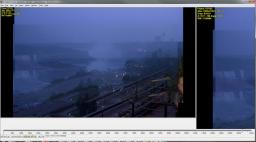
(click to see large image)
The very same scene is fixed just a few frames later, but these I just can't get right.
Here's my code:
Code: config=OverlayConfig(subpixel=2,minOverlayArea=80,minSourceArea=80,scaleBase=1.1,minSampleArea=200,requiredSampleArea=500,acceptableDiff=10)
OverlayEngine(srcdehalo2.ConvertToY8(), src2.ConvertToY8(), configs=config,editor=false,maxDiff=10,backwardFrames=0,forwardFrames=0)
OverlayRender(srcdehalo2.ConvertToYV24(), src2.ConvertToYV24(), debug=true, noise=0,\
upsize="Spline64Resize", mode=3, gradient=10,coloradjust=2,width=1920,height=1080,opacity=0.5)
ConvertToRGB24()
There's lots of random frames across the movie that break out like this. Most seem to have something in common, namely that they all tend to have big flat areas or are rather dark. It's still kinda ridiculous imo, because these frames were almost perfectly aligned to begin with (both same resolution too). The color is a bit off, as the master is different, but there's no way to make a blanket change from one to the other, as it varies per scene.
I'd try the maxX variables and stuff like that, but in some sparse scenes a bigger change is actually necessary, so I'm hesitant about that.
Edit: Tried out minY and maxY. Doesn't work, although it minimally improves the result. Plus, when I set these parameters, suddenly the tool ignores the crop mode and starts cropping despite mode=3. 
Edit 2: Maybe the problem here is that the brightness is different, as spoRv pointed out in his own post. Thus the sky in one image is roughly as bright as the woods in the other image, leading to an error. But looking at the image, this is a ridiculous error. I suggest therefore that some other measure than average Diff be offered, where individual details have more weight over big flat areas when calculating the Diff. That would probably solve the issue here.
Edit 3: Applying Levels to the clip that fed into OverlayEngine() with gamma adjustment helped in this particular case. Thx spoRv 
Posts: 7,151
Threads: 601
Joined: 2015 Jan
Thanks: 1081
Given 1505 thank(s) in 969 post(s)
Country:
Try also backwardFrames=8 and forwardFrames=8, it should help, I think...
deleted user
Unregistered
Thanks:
Given thank(s) in post(s)
Thanks spoRv. Sadly that is not an option, because in this case the sources are not stabilized to each other, so I had to define the backwards frames as 0 explicitly, as advised by the author of the plugin. Though I wonder if I need to put forwardFrames to 0 as well to get optimum results.
Posts: 7,151
Threads: 601
Joined: 2015 Jan
Thanks: 1081
Given 1505 thank(s) in 969 post(s)
Country:
Posts: 195
Threads: 2
Joined: 2017 Dec
Thanks: 12
Given 251 thank(s) in 90 post(s)
Country:
2018-02-18, 09:59 AM
(This post was last modified: 2018-02-18, 10:05 AM by random.next.)
deleted user
Unregistered
Thanks:
Given thank(s) in post(s)
Posts: 7,151
Threads: 601
Joined: 2015 Jan
Thanks: 1081
Given 1505 thank(s) in 969 post(s)
Country:
|




 and forgive my "do-not-follow-the-instructions-given" way of using it!