2019-09-04, 10:39 PM
Sadly don't have the PNG files and the LUT handy right now, but I still had JPEGs and made a proof of concept:
http://www.framecompare.com/image-compar...n/J9FJMNNU
You'll have to do your own collage anyway, mine didn't have enough highlights and thus has the infamous DrDre-highlights problem, haha.
Here are the images in that comparison:
1. UHD
2. UHD, but with colors fixed with Photoshop UHD HDR profile, with Exposure adjustment layer (-0,46 exposure), converted back to sRGB
3. previous one regraded with DrDre to iTunes
4. DrDre regrade, but additionally I applied a gaussian regrade (see the thread I made a few days ago) with 2pixel radius (this whole collage is 50% sized).
5. iTunes
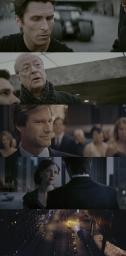
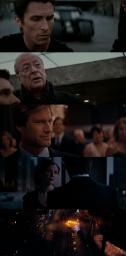
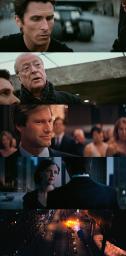
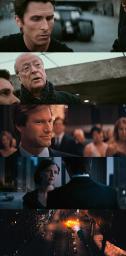
As you can see, DrDre is already very close. With the Gaussian Regrade on top, it's practically indistinguishable from the iTunes
EXCEPT for those pesky little red lights. See those? Those are the reason I gave up on the project a long while back. The Gaussian regrade fixes some of the highlights, like in the big fire with the bus, but those little point lights just aren't as they should be. I know it's a very minor almost OCD-like complaint, but I love those bright red point lights on the iTunes and if I can't get those, I'm not doing it!!!! haha
I believe it has to be some kind of tonemapping, in particular one that regrades based on frequency content. In other words, there are some tone mapping algorithms that basically take the low frequency content (imagine the image blurred), and apply the tonemapping to that, and then put the high frequencies (fine detail) back in. That way it keeps the detail and saturation in the highlights instead of just compressing them completely.
However I never had the motivation to try and find such a tone mapping algorithm that would help replicate those brilliant little red lights.
http://www.framecompare.com/image-compar...n/J9FJMNNU
You'll have to do your own collage anyway, mine didn't have enough highlights and thus has the infamous DrDre-highlights problem, haha.
Here are the images in that comparison:
1. UHD
2. UHD, but with colors fixed with Photoshop UHD HDR profile, with Exposure adjustment layer (-0,46 exposure), converted back to sRGB
3. previous one regraded with DrDre to iTunes
4. DrDre regrade, but additionally I applied a gaussian regrade (see the thread I made a few days ago) with 2pixel radius (this whole collage is 50% sized).
5. iTunes
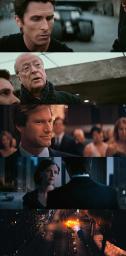
As you can see, DrDre is already very close. With the Gaussian Regrade on top, it's practically indistinguishable from the iTunes
EXCEPT for those pesky little red lights. See those? Those are the reason I gave up on the project a long while back. The Gaussian regrade fixes some of the highlights, like in the big fire with the bus, but those little point lights just aren't as they should be. I know it's a very minor almost OCD-like complaint, but I love those bright red point lights on the iTunes and if I can't get those, I'm not doing it!!!! haha
I believe it has to be some kind of tonemapping, in particular one that regrades based on frequency content. In other words, there are some tone mapping algorithms that basically take the low frequency content (imagine the image blurred), and apply the tonemapping to that, and then put the high frequencies (fine detail) back in. That way it keeps the detail and saturation in the highlights instead of just compressing them completely.
However I never had the motivation to try and find such a tone mapping algorithm that would help replicate those brilliant little red lights.